AWS S3 Storage Classes: The Cost-Optimization Decision the SAA-C03 Tests Every Time
Eight S3 storage classes, one exam scenario — learn exactly when the SAA-C03 expects Standard, Intelligent-Tiering, Glacier Instant, and Deep Archive, and how to decode any cost-optimization question in under a minute.
Here is a scenario you will see on the SAA-C03:
A media company stores 500 TB of video assets in S3 Standard. A cost audit reveals that 70% of those assets have not been accessed in over a year, and the engineering team expects them to be accessed at most once a quarter going forward — but when they are needed, the video pipeline requires millisecond retrieval. What is the most cost-effective storage configuration?
Four answer choices appear. One migrates all assets to S3 Glacier Deep Archive. One uses S3 Intelligent-Tiering. One uses S3 Glacier Instant Retrieval. One uses S3 Lifecycle rules to transition assets to S3 Standard-IA after 30 days and then to S3 Glacier Flexible Retrieval after 90 days.
The answer is S3 Glacier Instant Retrieval — but only if you know that "Glacier" does not automatically mean slow retrieval. Glacier Instant Retrieval gives you archive-tier storage pricing with millisecond latency, making it the only class that satisfies both the "quarterly access" and "millisecond retrieval" constraints simultaneously. Deep Archive retrieves in 12–48 hours. Intelligent-Tiering costs more per GB for a known access pattern. The Lifecycle option ends in Glacier Flexible, which takes hours.
AWS S3 storage classes are the exam's primary vehicle for cost-optimization domain questions — they appear across Design Cost-Optimized Architectures and Design High-Performing Architectures, often disguised as operational efficiency or resilience scenarios. The exam does not test whether you can recite eight class names. It tests whether you can map a described constraint to the one class that satisfies it. This guide gives you that map.
What S3 Storage Classes Are (And the Three Axes the Exam Uses)
Every AWS S3 storage class is a trade-off across three axes:
- Storage cost per GB per month — how much you pay to store data at rest
- Retrieval cost and speed — whether there is a per-GB retrieval fee, and how quickly the object becomes available after a GET request
- Durability and redundancy — how many copies AWS maintains and across how many Availability Zones
The SAA-C03 constructs scenarios around constraints on these axes. "Millisecond retrieval required" eliminates Glacier Flexible and Deep Archive. "Single AZ acceptable" unlocks cheaper tiers. "Unknown access pattern" points to Intelligent-Tiering. "Seven-year compliance retention, accessed less than once per year" points to Deep Archive. Master the axes and you can derive the right answer from the scenario constraints rather than memorizing each case individually.
The Eight Classes, Grouped by Purpose
Active Data: Standard and Express One Zone
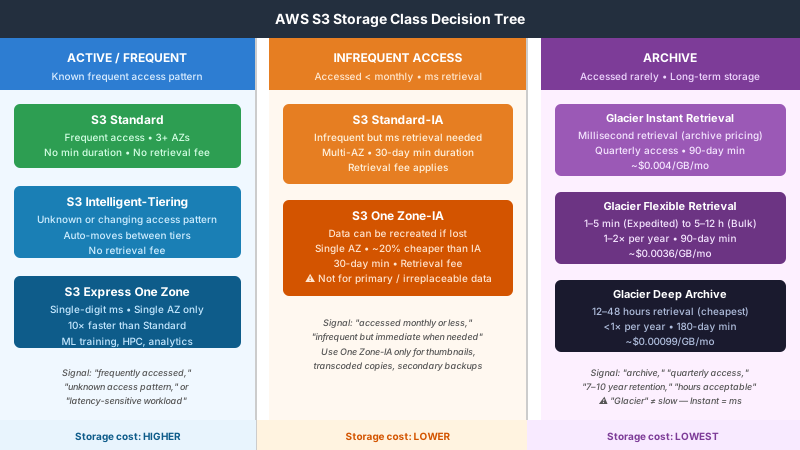
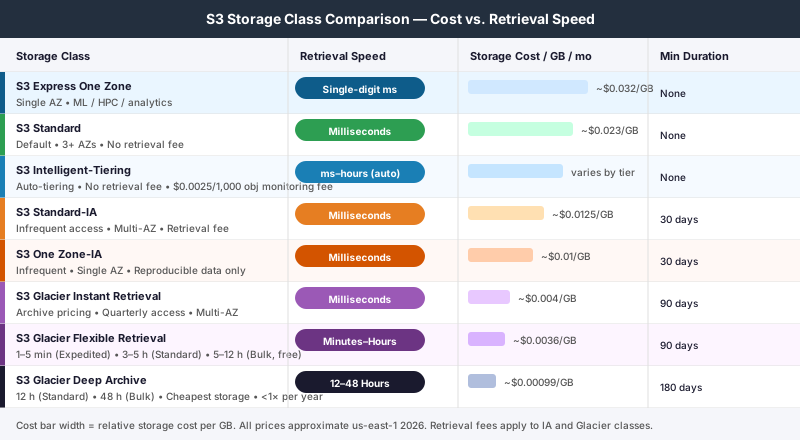
S3 Standard is the default storage class, optimized for data you access regularly. It stores data across a minimum of three Availability Zones, with 99.999999999% durability and a 99.99% availability SLA. There are no minimum storage duration charges and no retrieval fees. When a scenario does not specify a cost constraint, Standard is the baseline you measure alternatives against.
S3 Express One Zone is the high-performance tier introduced in 2023 and now appearing in SAA-C03 exam questions. It stores data in a single AZ using a purpose-built "directory bucket" architecture, delivering single-digit millisecond latency and up to 10× higher request throughput than S3 Standard. The trade-off is durability: a single AZ means data loss if that AZ fails. Express One Zone is not a cost-saving tier — it costs more per GB than Standard. The exam signals it with performance requirements: "single-digit millisecond latency for ML training jobs," "interactive analytics with extremely high request rates," or "co-located storage for latency-sensitive compute workloads."
Unknown Access Patterns: Intelligent-Tiering
S3 Intelligent-Tiering automatically moves objects between access tiers as usage patterns change. New objects land in Frequent Access. After 30 consecutive days without access, they move to Infrequent Access at lower storage cost. Optionally, you can enable Archive Instant Access (90 days inactive), Archive Access (90 days, minutes-to-hours retrieval), and Deep Archive Access (180 days, 12-hour retrieval) tiers.
Two Intelligent-Tiering mechanics the SAA-C03 exploits:
Monitoring fee: There is a $0.0025-per-1,000-objects-per-month monitoring charge. For workloads with large quantities of small objects — millions of tiny log lines, for example — the monitoring overhead can exceed the storage savings. Intelligent-Tiering is uneconomical in this scenario.
128 KB minimum monitored object size: Objects smaller than 128 KB are not monitored and remain permanently in Frequent Access regardless of how infrequently they are accessed. If a scenario describes a bucket full of very small objects with infrequent access, Intelligent-Tiering will not move them — Standard-IA is more appropriate.
The exam signals for Intelligent-Tiering: "unpredictable access patterns," "access frequency changes over time," "no manual management of transitions," or "minimize cost without predicting access frequency."
Infrequent Access: Standard-IA and One Zone-IA
Both S3 Standard-IA and S3 One Zone-IA target data you access infrequently — typically monthly or less — but need immediately when you do. Both carry:
- A 30-day minimum storage duration: objects deleted or transitioned before 30 days still incur the full 30-day charge
- A 128 KB minimum billable object size: smaller objects are charged as if they were 128 KB
- A per-GB retrieval fee (approximately $0.01/GB in us-east-1)
The only meaningful difference is redundancy. Standard-IA spans at least three Availability Zones with the same 99.999999999% durability as Standard. One Zone-IA stores data in a single AZ — if that AZ is permanently destroyed, the data is gone, which drops availability to 99.5%.
The exam rule for One Zone-IA is consistent: it appears correctly only when the scenario states that the data can be recreated or is a secondary copy. Image thumbnails generated from originals stored elsewhere, transcoded video where the source exists in Standard, secondary backup copies of data that also lives in another location — these are the One Zone-IA scenarios. If the scenario involves primary records, customer data, or anything described as irreplaceable, One Zone-IA is a trap answer even when cost is the stated optimization goal.
Archives: Glacier Instant, Glacier Flexible, and Glacier Deep Archive
All three archive classes share minimum storage durations — 90 days for Glacier Instant and Flexible, 180 days for Deep Archive — and a higher retrieval fee than the IA classes. What separates them is retrieval speed:
S3 Glacier Instant Retrieval retrieves objects in milliseconds — the same latency as Standard, despite the "Glacier" name. Storage cost drops to roughly $0.004/GB/month (about one-sixth of Standard). The 90-day minimum and elevated retrieval fee apply, but for data accessed quarterly or less that still requires fast retrieval when needed, this is the purpose-built class. The word "Glacier" in the name is the source of one of the exam's most reliable traps.
S3 Glacier Flexible Retrieval takes minutes to hours: Expedited (1–5 minutes), Standard (3–5 hours), or Bulk (5–12 hours, no retrieval fee). Storage cost falls further to approximately $0.0036/GB/month. Use this when the workload can tolerate a lead time of at least several minutes — archive video masters retrieved during production edits, compliance records pulled for audit reviews, regulatory data that needs to be surfaced within hours but not seconds.
S3 Glacier Deep Archive retrieves in 12–48 hours at the lowest storage price of any class — approximately $0.00099/GB/month in us-east-1. The 180-day minimum and highest retrieval fee make it optimal for true long-term archives: seven-to-ten year compliance retention, legal holds, cold data accessed less than once per year where hours-long retrieval is contractually acceptable.
S3 Lifecycle Policies: How the Exam Tests Automated Transitions
A Lifecycle configuration is a set of rules that automatically transition objects between storage classes or delete them after a specified number of days. The SAA-C03 uses Lifecycle questions to combine cost-optimization with "minimal operational overhead" — the combination signals Lifecycle over manual management.
Key lifecycle mechanics the exam tests:
Transitions are one-directional via Lifecycle. You can move objects from Standard → Standard-IA → Glacier via Lifecycle rules. You cannot use a Lifecycle rule to restore objects from Glacier back to Standard — that is a separate restore operation that creates a temporary Standard copy. This matters when a scenario asks about restoring archived data for ongoing access.
Minimum residency before transition. Objects must remain in Standard for at least 30 days before a Lifecycle rule can transition them to Standard-IA or One Zone-IA. Separately, objects must remain in any IA class for at least 30 days before transitioning to Glacier. A Lifecycle rule that moves objects directly from Standard to Standard-IA after 7 days is a trap answer — the 30-day minimum makes it invalid, and AWS will charge the minimum anyway.
A common SAA-C03 Lifecycle scenario:
"An e-commerce company stores order records in S3 Standard. Records are accessed frequently for the first 30 days after an order. For the next 60 days, they may be accessed if a customer files a dispute. After 90 days, records must be retained for 7 years for regulatory compliance but are almost never accessed. Design the most cost-effective configuration."
Answer: A Lifecycle configuration that transitions objects to Standard-IA at day 30, to Glacier Flexible Retrieval at day 90, and expires (deletes) them at day 2,555 (7 years). Each stage matches the described access pattern to the appropriate class with no manual management required.
Common Exam Traps
Trap 1: "Glacier" means slow retrieval. Glacier Instant Retrieval delivers millisecond latency — the same as S3 Standard. "Glacier" in the name signals archive-tier pricing, not hours-long retrieval. When a scenario requires archive pricing and fast access, Glacier Instant Retrieval is the answer. Candidates who read "Glacier" and immediately eliminate it give away this question.
Trap 2: One Zone-IA is suitable for any infrequent data. One Zone-IA stores data in a single Availability Zone. If that AZ is permanently destroyed, the data is lost. It is only appropriate when the scenario explicitly states that the data can be recreated, that it is secondary, or that a more durable primary copy exists elsewhere. For primary, irreplaceable data, One Zone-IA is a wrong answer regardless of how appealing the cost saving looks.
Trap 3: Intelligent-Tiering is always the right answer for unknown access patterns. Intelligent-Tiering is ideal when the access pattern is genuinely unknown or variable. But the per-object monitoring fee makes it uneconomical for large quantities of small objects. And objects under 128 KB are never monitored — they stay in Frequent Access permanently. When a scenario involves small files with infrequent access, Standard-IA will outperform Intelligent-Tiering on total cost.
Trap 4: You can immediately lifecycle-transition objects from Standard to IA. The minimum residency in Standard before transitioning to any IA class is 30 days. A Lifecycle rule set to transition at day 1, 7, or 14 is an invalid configuration — AWS still charges the 30-day minimum for the IA class. Any answer describing an immediate or sub-30-day transition to IA is describing a configuration that does not save the money it implies.
Trap 5: Deep Archive is right for any "long-term archive" scenario. Deep Archive retrieves in 12–48 hours. Any scenario that includes "occasional access," "may need to be retrieved on short notice," or "retrieved within hours" eliminates Deep Archive. The correct answer in those cases is Glacier Flexible (minutes to hours) or Glacier Instant (milliseconds), depending on the SLA described.
Trap 6: S3 Express One Zone is just a cheaper One Zone-IA for high-traffic scenarios. Express One Zone is a performance class, not a cost-saving class. It costs more per GB stored than Standard. The exam signals it with performance and throughput requirements — not with "reduce storage cost" language. Picking Express One Zone for cost optimization is always wrong.
The Decision Framework
When you see any S3 storage question on the SAA-C03, run through this checklist:
- "Access pattern unknown or unpredictable" → S3 Intelligent-Tiering
- "Frequently accessed, default behavior" → S3 Standard
- "Single-digit millisecond latency, ML training, high IOPS, single AZ acceptable" → S3 Express One Zone
- "Infrequently accessed (monthly or less), millisecond retrieval, multi-AZ required" → S3 Standard-IA
- "Infrequently accessed, data can be recreated, single AZ acceptable" → S3 One Zone-IA
- "Archive pricing needed, millisecond retrieval still required, quarterly access" → S3 Glacier Instant Retrieval
- "Archive, minutes-to-hours retrieval acceptable, accessed 1–2× per year" → S3 Glacier Flexible Retrieval
- "Long-term compliance archive, 12–48 hours retrieval OK, accessed <1× per year" → S3 Glacier Deep Archive
- "Minimize total cost for data with unknown access pattern" → Intelligent-Tiering (not Deep Archive — unknown access ≠ archived)
- "Lifecycle automation across access stages over time" → Lifecycle policy combining Standard → IA → Glacier → expire
- "Glacier" in the answer + scenario requires fast access → Read carefully; Glacier Instant = milliseconds, Flexible = hours
Three Scenario Walkthroughs
Scenario 1: The Quarterly Archive with Fast Retrieval
"A financial analytics firm stores 200 TB of model training datasets in S3 Standard. Data is generated monthly and used heavily for the first week, then accessed once per quarter for backtesting. When accessed quarterly, the backtesting job requires millisecond access to avoid pipeline delays. The company wants to minimize ongoing storage cost without changing the pipeline's access pattern."
Distractor: S3 Intelligent-Tiering. Wrong. Intelligent-Tiering might move objects to Infrequent Access after 30 days, which is good. But the access pattern is known (used heavily for a week, then quarterly), which makes Intelligent-Tiering the more expensive option compared to managing the class explicitly. Known access patterns should use explicit classes.
Distractor: S3 Glacier Deep Archive. Wrong. Deep Archive retrieves in 12–48 hours. The backtesting job requires millisecond access — Deep Archive immediately fails the retrieval SLA.
Distractor: S3 Lifecycle to Standard-IA after 30 days. Partially correct but not optimal. Standard-IA provides millisecond retrieval at lower cost. However, Glacier Instant Retrieval at $0.004/GB/month is significantly cheaper than Standard-IA at $0.0125/GB/month while still delivering millisecond retrieval. Since the data is only accessed quarterly (not monthly), Glacier Instant's pricing is more appropriate.
Correct: S3 Glacier Instant Retrieval (or a Lifecycle rule: Standard for 30 days → Glacier Instant). Millisecond retrieval for quarterly access at archive-tier pricing. The higher per-retrieval fee is justified by the much lower storage cost over the 200 TB base.
Scenario 2: The Thumbnail Store
"A photo-sharing application generates a 128×128 JPEG thumbnail for every photo uploaded. The originals are stored in S3 Standard. Thumbnails are displayed frequently during browsing but can be regenerated from the originals if lost. The company wants to minimize storage cost for the thumbnail bucket while maintaining fast display times."
Distractor: S3 Intelligent-Tiering. Wrong. Thumbnails are small files (likely under 128 KB), which means they would not be monitored by Intelligent-Tiering and would remain in Frequent Access permanently — while incurring the per-object monitoring fee. This is worse than Standard.
Distractor: S3 One Zone-IA. Wrong for this scenario, actually — thumbnails are frequently accessed during browsing, not infrequently. The retrieval fee would hurt more than the storage savings help.
Correct: S3 Standard, or S3 Standard for the frequent-access window and review whether a CDN like CloudFront serving from Standard makes more sense. For infrequently accessed thumbnails (if the scenario indicated less frequent access), One Zone-IA would be appropriate because the thumbnails can be regenerated. This scenario specifically says "displayed frequently," which keeps Standard as the right answer.
Scenario 3: The Compliance Archive
"A healthcare company must retain patient billing records for 10 years by regulation. Records are accessed during the first 30 days for billing reconciliation. For years 1–3, records may be accessed if a patient disputes a charge. After year 3, they are considered cold and accessed fewer than once per year. The company wants the most cost-effective storage plan."
Correct: S3 Lifecycle policy:
- Days 0–30: S3 Standard (active billing period)
- Days 30–1095 (3 years): S3 Standard-IA (possible dispute access, millisecond retrieval)
- Day 1095–3650 (years 3–10): S3 Glacier Deep Archive (cold, hours-long retrieval acceptable, cheapest storage)
- Day 3650: Lifecycle expiration rule deletes the objects
This is the model multi-stage answer: each phase matched to the described access pattern, fully automated, no manual intervention required.
Practice Makes the Pattern Stick
S3 storage classes follow a consistent internal logic — storage cost decreases as retrieval speed decreases — but the exam complicates that logic with minimum durations, retrieval fees, the counterintuitive Glacier Instant Retrieval millisecond speed, and the Intelligent-Tiering small-object exception. Understanding the structure beats memorizing eight bullet lists.
The free SAA-C03 practice questions include cost-optimization scenarios that test exactly these trade-offs in the scenario-based format the exam uses. Working through them before your exam date builds the pattern recognition you need to answer these questions in under a minute under test conditions.
Take the free 10-question SAA-C03 diagnostic to see where you stand across all four exam domains — per-domain scoring shows whether cost-optimization is your current gap or just one of many to close.
For a complementary deep-read: the Aurora vs. RDS guide covers another high-leverage SAA-C03 topic where the exam exploits a counterintuitive naming convention — and applies the same scenario-based decision framework covered here.