EBS vs EFS vs S3: The AWS Storage Decision the SAA-C03 Tests Every Single Time
Amazon EBS, EFS, and S3 each solve a fundamentally different storage problem — and the SAA-C03 tests all three in the same scenario. Master the access-pattern model, the sharing model, and the exam signal words that pick the right AWS storage service in under 30 seconds.
Here is the scenario you will see on the SAA-C03:
A media company runs a fleet of 12 EC2 instances across three Availability Zones that process video thumbnails. Each instance must read from and write to the same working directory of source files. The company also wants to store the finished thumbnails so they can be served to end users globally. A solutions architect is designing the storage layer. What combination of AWS services should they recommend?
Four answer choices: Two EBS volumes with cross-mount. One EBS volume with Multi-Attach. EFS for shared working files and S3 for finished thumbnails. EFS for both working files and thumbnails.
The correct answer is EFS for the shared working directory and S3 for the finished thumbnails — but only if you understand why each wrong answer fails. EBS cross-mount doesn't exist. Multi-Attach is single-AZ and only for io2. And storing thumbnails in EFS instead of S3 works technically but costs five to ten times more per GB for a workload that doesn't need filesystem semantics.
The EBS vs EFS vs S3 decision is one of the SAA-C03's most reliably recurring storage topics. AWS gives you three architecturally distinct storage services — block, file, and object — each designed for a different access pattern. This guide gives you the mental model, the decision tree, and the exact exam signal words for all three.
Three AWS Storage Services, Three Access Models
The first thing to internalize: EBS, EFS, and S3 are not competing versions of the same thing. They are three different storage abstractions:
- Amazon EBS (Elastic Block Store) — block storage. Works like a virtual hard disk. An EC2 instance sees it as a raw block device, formats it with a filesystem, and mounts it. Designed for low-latency, high-IOPS access from one instance at a time.
- Amazon EFS (Elastic File System) — file storage. A managed NFS (Network File System) that multiple EC2 instances can mount simultaneously, across Availability Zones. Provides POSIX-compliant file semantics — directories, permissions, file locking.
- Amazon S3 (Simple Storage Service) — object storage. Stores flat objects (files + metadata) accessed via HTTP REST API. There is no mount point — application code uses the AWS SDK or CLI to put and get objects. Scales to virtually unlimited size at the lowest cost per GB.
The exam's job is to describe a scenario and have you identify which abstraction fits. The access model is your fastest path to the answer: block access → EBS, shared file access → EFS, API/object access → S3.
The AWS Storage Decision Tree
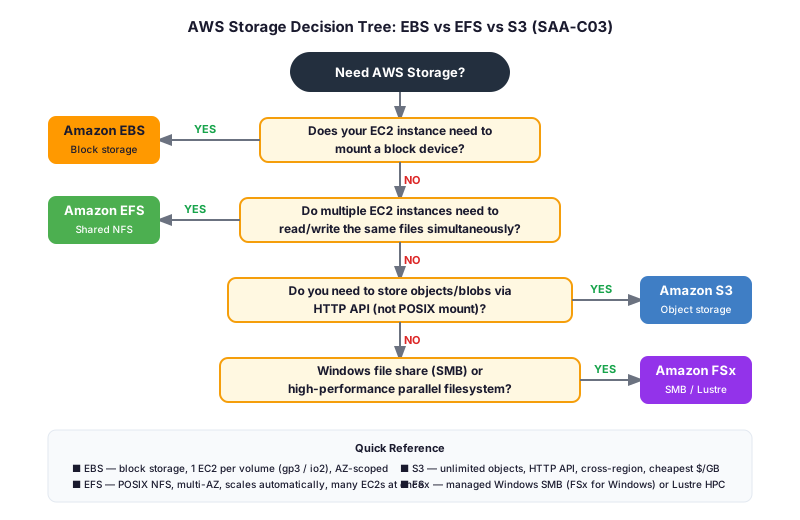
Work through this in order when a storage scenario appears:
1. Does an EC2 instance need to mount a block device (like a hard drive)? → YES: EBS. This is the core EBS use case — boot volumes, databases, any workload requiring raw block I/O.
2. Do multiple EC2 instances need to read and write the same files simultaneously? → YES: EFS. If the scenario describes a shared directory accessible by a fleet of instances across AZs, EFS is the answer. EBS cannot do this in general.
3. Does the application access storage via an API, SDK, or HTTP (not a mounted filesystem)? → YES: S3. Static websites, data lakes, backup destinations, media serving — anything accessed by URL, SDK call, or REST API.
4. Does the scenario mention Windows file shares (SMB/CIFS) or high-performance parallel filesystems (HPC/Lustre)? → YES: Amazon FSx. FSx for Windows File Server for SMB; FSx for Lustre for HPC workloads.
Amazon EBS: Block Storage Deep Dive
EBS volumes attach to one EC2 instance at a time. Think of it exactly like a physical hard drive — the OS formats it (ext4, xfs, NTFS), mounts it, and treats it as a local disk. All block-level I/O goes directly between the EC2 hypervisor and EBS, over AWS's internal network, without ever touching the public internet.
EBS volume types (the exam tests these):
- gp3 (General Purpose SSD): The default for most workloads. 3,000 IOPS baseline regardless of volume size, scalable to 16,000 IOPS and 1,000 MB/s throughput independently. gp3 replaced gp2 as the standard — "general-purpose SSD" on the exam means gp3.
- io2 (Provisioned IOPS SSD): For I/O-intensive databases (Oracle, SQL Server, high-traffic MySQL/PostgreSQL) that need guaranteed IOPS. Up to 64,000 IOPS per volume (256,000 with io2 Block Express), 99.999% durability. Signal: "high IOPS," "I/O-intensive database," "sub-millisecond latency."
- st1 (Throughput Optimized HDD): For large sequential reads — big data, log processing, data warehouses. Cannot be a boot volume.
- sc1 (Cold HDD): Lowest-cost EBS option for cold, infrequently accessed data.
What EBS is NOT:
EBS volumes are Availability Zone-scoped. If your EC2 instance is in us-east-1a, your EBS volume must also be in us-east-1a — you cannot attach an EBS volume across AZs. To move an EBS volume to another AZ, you take a snapshot and restore it there. This AZ coupling is a critical exam fact and disqualifies EBS for any multi-AZ shared storage requirement.
EBS Multi-Attach allows one io1 or io2 volume to be attached to multiple EC2 instances simultaneously — but only within the same Availability Zone, and only for applications that manage their own concurrent-write concurrency (Oracle RAC is the classic example). It is not a general-purpose solution for "multiple instances need the same files" — the same-AZ constraint alone disqualifies it for most scenarios that ask for shared storage across a fleet.
Amazon EFS: Shared File Storage Deep Dive
EFS is a managed NFS (Network File System) version 4.1. You mount it to any EC2 instance (or Lambda, or ECS task) using a standard NFS mount command. Once mounted, it looks like any other Linux directory — you ls, cat, mkdir, and chmod exactly as you would locally. Multiple instances can mount the same EFS file system at the same time and see each other's writes in near-real time.
What makes EFS unique:
- Multi-AZ by default. EFS data is stored redundantly across multiple Availability Zones within a region. Instances in us-east-1a, us-east-1b, and us-east-1c can all mount the same EFS file system simultaneously. An EBS volume can be attached to only one AZ.
- Automatic scaling. EFS grows and shrinks automatically as you add and remove files. You do not provision capacity — you never run a
resize2fsor a storage expansion task. An EBS volume is provisioned to a fixed size; you must resize it manually when you run out of space. - POSIX semantics. File locking (
flock), permissions (chmod/chown), hard links, and directory trees all work exactly as on a local filesystem. This is essential for applications that were designed to run against a POSIX filesystem and cannot be refactored to use an API. - EFS Infrequent Access (EFS-IA). A lifecycle policy moves files not accessed for a configurable period to the cheaper EFS-IA tier. The exam tests this as the EFS cost-optimization answer for mixed hot/cold workloads.
EFS performance modes:
- General Purpose (default): Low latency. Best for web serving, CMS, and home directories.
- Max I/O: Higher aggregate throughput, slightly higher latency. For massively parallel workloads with thousands of clients.
What EFS is NOT:
EFS is Linux-only (NFS). It does not support Windows SMB/CIFS. If the scenario mentions Windows instances sharing files, the answer is Amazon FSx for Windows File Server, not EFS.
EFS also costs more per GB than S3. If a scenario describes storing finished artifacts, backups, or media assets that are accessed by URL or downloaded — not mounted — S3 is the cheaper, more scalable answer.
Amazon S3: Object Storage Deep Dive
S3 stores objects — each object is a file plus metadata, stored under a key (the path-like name) in a bucket. There is no filesystem, no mount, and no directory hierarchy (prefixes like images/2026/thumb.jpg simulate folders but are not real directories). Your application interacts with S3 through the AWS S3 API, the AWS SDK, the CLI (aws s3 cp), or a pre-signed URL.
What makes S3 unique:
- Virtually unlimited scale. A single S3 bucket can store trillions of objects. There is no capacity to provision, no volume to resize, no filesystem to manage.
- 11 nines of durability. S3 Standard automatically stores data across at least three Availability Zones, providing 99.999999999% durability. An EBS volume stores its data in a single AZ.
- Regional scope with global serving. S3 buckets are in a region; objects are accessible from anywhere via HTTPS. Combined with Amazon CloudFront, S3 is the standard architecture for serving static assets globally.
- Storage classes for cost optimization. S3 Standard → S3 Standard-IA → S3 One Zone-IA → S3 Glacier Instant Retrieval → S3 Glacier Flexible Retrieval → S3 Glacier Deep Archive form a cost ladder from most-available to cheapest. The S3 storage classes guide covers the access-time and cost tradeoffs the SAA-C03 tests across this ladder.
- Static website hosting, versioning, replication, lifecycle policies, event notifications. S3 has a rich feature set — object versioning, cross-region replication (CRR), lifecycle transitions, event notifications to Lambda or SQS/SNS. Each of these is exam territory.
What S3 is NOT:
S3 is not a mounted filesystem. You cannot install a database directly on S3 (you can back up to it, but the database needs block storage — EBS — for its active data files). You cannot run an EC2 boot volume from S3. You cannot call open() on an S3 object from application code the way you would a local file without using the SDK or a compatibility layer.
S3 provides read-after-write consistency for PUTs and DELETEs of individual objects (since December 2020). List operations can still lag slightly. For workloads requiring strong consistency at the block or file level, use EBS or EFS instead.
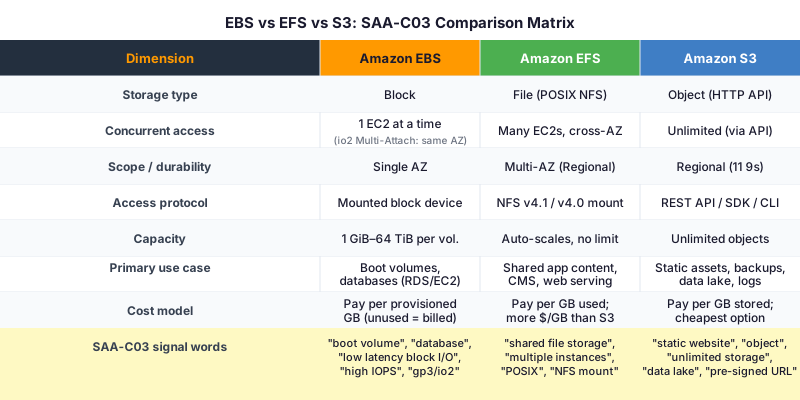
The Full Comparison Matrix
FSx: The Fourth Storage Family
The SAA-C03 also tests Amazon FSx — AWS's managed third-party file systems. Two variants appear regularly:
- FSx for Windows File Server: Fully managed Windows SMB/CIFS file shares backed by Windows Server. Integrates with Active Directory. The exam signal is any mention of Windows workloads needing shared file storage, SMB/CIFS protocol, or Active Directory integration. EFS cannot satisfy these requirements — it is NFS-only.
- FSx for Lustre: High-performance parallel filesystem for HPC, machine learning training, and video rendering. Can be linked to S3 — Lustre presents the S3 bucket as a high-throughput filesystem for compute jobs. The signal words are "HPC," "parallel processing," "machine learning training data," or "Lustre."
FSx is not a replacement for EFS — they solve different protocol and performance needs. The decision rule: Linux + NFS → EFS. Windows + SMB → FSx for Windows. HPC/parallel → FSx for Lustre.
Exam Scenario Drills
Scenario 1: A company hosts a WordPress website on 5 EC2 instances behind an ALB. The /wp-content/uploads directory must be shared across all instances so that media uploaded on one server is visible on all others. What storage solution should the architect recommend?
→ EFS. Key signals: multiple EC2 instances need to share the same directory tree with write access, POSIX semantics (WordPress uses standard filesystem calls), and multi-AZ availability. EBS cannot be shared across multiple instances in different AZs. S3 would require rewriting WordPress's file upload path to use the SDK.
Scenario 2: A financial services company runs an Oracle RAC database cluster on two EC2 io2 instances in the same Availability Zone. The database requires shared block-level access to its data volumes with guaranteed IOPS. What should the architect configure?
→ EBS io2 Multi-Attach. This is the specific, narrow use case Multi-Attach was built for: clustered database workloads (Oracle RAC) on io2 instances in the same AZ. The signals are: block-level access (not file), same Availability Zone, clustered application that manages its own concurrency. If the instances were in different AZs, Multi-Attach would be disqualified — use EFS.
Scenario 3: A data engineering team processes 500 TB of raw log files per month. The files are written once and read within 30 days, then rarely accessed. The team wants to minimize storage costs. Which service and configuration should they use?
→ S3 with an S3 Lifecycle policy transitioning to S3 Glacier Flexible Retrieval after 30 days. S3 Standard is cheapest for actively read data; Glacier drops the per-GB cost dramatically for archival. EFS would cost an order of magnitude more per GB for a use case that doesn't require POSIX semantics. EBS volumes cap at 64 TiB each and would require dozens of volumes for 500 TB.
Scenario 4: A video render farm needs hundreds of EC2 instances to read input files and write output frames to a shared Linux directory. What storage does the architect choose for the shared working directory?
→ EFS (Max I/O performance mode). Shared directory, POSIX calls, Linux, hundreds of clients — every signal points to EFS. Max I/O mode suits highly parallel workloads. Finished frames move to S3 for cost-efficient long-term storage.
Scenario 5: A company migrates a legacy Windows application from an on-premises file server to AWS. The application reads and writes to SMB shares using UNC paths (\SERVER\SHARE). Dozens of Windows EC2 instances access the shares. What is the correct AWS storage service?
→ Amazon FSx for Windows File Server. The SMB protocol, UNC paths, and Windows instances are unmistakable FSx signals. EFS uses NFS and is incompatible with Windows SMB. EBS cannot be shared. S3 has no SMB support.
The Storage Signal Word Map
Keep this reference in memory — it reduces any storage question to pattern recognition:
"Boot volume," "OS disk," "database storage," "high IOPS," "gp3," "io2," "Provisioned IOPS," "block storage," "root volume" → EBS
"Shared file storage," "multiple instances," "NFS mount," "POSIX," "concurrent read/write," "shared directory," "common working directory," "web farm shared content" → EFS
"Object storage," "static website," "pre-signed URL," "data lake," "backup destination," "unlimited storage," "HTTP access," "cross-region replication," "lifecycle policy," "Glacier" → S3
"Windows file share," "SMB," "CIFS," "UNC path," "Active Directory," "Lustre," "HPC," "parallel filesystem" → FSx
Put the Storage Decisions on Autopilot
Storage questions on the SAA-C03 follow reliable patterns. Once you've seen 15–20 of them, the signal words map to services automatically. The free 10-question diagnostic includes storage questions and shows you exactly which sub-domains need work before exam day.
The SAA-C03 practice question set has a dedicated storage module with scenario-based questions at exam difficulty, covering EBS volume types, EFS vs. EBS trade-offs, S3 storage class selection, and FSx use cases. Getting the storage layer right is worth a significant fraction of Domain 2 (High-Performing Architectures) and Domain 3 (Secure Architectures). Storage questions don't have to be guesses — they can be free points.