EC2 On-Demand vs Reserved Instances vs Spot vs Savings Plans: The SAA-C03 Cost-Optimization Decision, Decoded
Five purchasing options, one EC2 instance, and 20% of your SAA-C03 score on the line. This guide decodes every pricing-model signal the exam hides in scenario questions — so you pick the right option every time, without memorizing tables.
Here is the SAA-C03 scenario that trips up half the candidates who haven't mapped EC2 pricing models properly:
A financial services company runs a core transaction-processing application on EC2. The application runs 24 hours a day, 7 days a week, and traffic is consistent and predictable. The company wants to minimize costs while ensuring the application is always available. Which purchasing option should a solutions architect recommend?
Four choices: On-Demand. Standard Reserved Instances (1-year). Spot Instances. Scheduled Reserved Instances.
If your first instinct is "Reserved Instances," you're not wrong — but the same question in 2026 might offer "EC2 Instance Savings Plans" as an option. If you don't know the distinction between Savings Plans and Reserved Instances, you'll hesitate on the question that should take you ten seconds.
Domain 4 of the SAA-C03 — "Design Cost-Optimized Architectures" — is worth 20% of your exam score, roughly 13 questions. EC2 purchasing options appear in multiple questions in this domain. Getting the model clear takes about 15 minutes; this guide does it in one pass.
The Five EC2 Purchasing Options (Why There Are Five, Not Two)
AWS gives you five ways to pay for EC2 compute. They exist because different workloads have different shapes — predictability, duration, interruption tolerance, tenancy requirements — and AWS prices each shape differently.
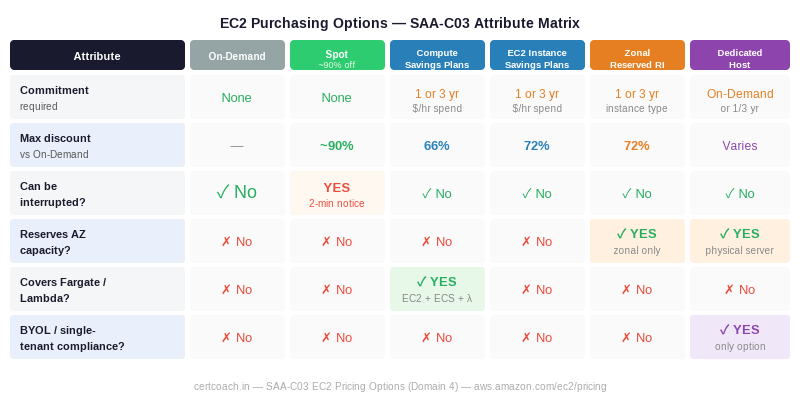
| Option | Commitment | Max Discount vs On-Demand | Interruptible? | Capacity Reserved? |
|---|---|---|---|---|
| On-Demand | None | — | No | No (best effort) |
| Savings Plans | 1 or 3 years | Up to 66–72% | No | No |
| Reserved Instances | 1 or 3 years | Up to 72% | No | Zonal RIs only |
| Spot Instances | None | Up to ~90% | Yes (2-min notice) | No |
| Dedicated Hosts | On-Demand or 1/3 yr | Varies | No | Yes (physical server) |
The exam doesn't ask you to recall discount percentages. It asks you to match a workload description to the correct purchasing option. The table above is the shape of the decision; the sections below are what actually appears in scenario questions.
On-Demand Instances: Pay for What You Use
On-Demand Instances are billed per second (Linux/macOS) or per hour (Windows) with no upfront commitment. You can launch and terminate them at any time.
When On-Demand is correct on the exam:
- Short-term, spiky, or unpredictable workloads where you cannot commit to a fixed usage level
- Development, test, or staging environments that run intermittently
- Applications being prototyped or first deployed — before you have enough usage data to commit to a plan
- Any scenario where the question says "no long-term commitment" or "can't predict usage"
What On-Demand does not do: it does not give you discounts, it does not reserve capacity in a specific AZ (you can add an On-Demand Capacity Reservation separately), and it is the most expensive option per hour.
Exam trap: don't confuse "unpredictable" with "cheap." A startup that cannot forecast load should use On-Demand even though it costs more per hour — because the alternative (committing to Reserved Instances you don't use) would cost more overall.
Savings Plans: The Modern Commitment Model
Savings Plans are a flexible pricing model introduced in 2019. You commit to spending a consistent dollar amount per hour for 1 or 3 years — for example, $10/hour — and AWS applies discounts to your usage up to that commitment level.
AWS now explicitly recommends Savings Plans over Reserved Instances for most new compute commitments. The documentation states: "We recommend Savings Plans over Reserved Instances."
There are two types the SAA-C03 tests directly:
Compute Savings Plans (Most Flexible)
Compute Savings Plans apply automatically to:
- Any EC2 instance regardless of instance family, size, AZ, Region, OS, or tenancy
- AWS Fargate
- AWS Lambda
Maximum discount: up to 66% off On-Demand pricing.
When the exam points here: any scenario that needs cost savings and flexibility. Phrases like "wants to reduce costs and retain the ability to change instance types," "workload spans multiple Regions," or "also runs containers on Fargate" point to Compute Savings Plans. The flexibility to cover Fargate and Lambda is a unique differentiator — no other commitment model covers all three.
EC2 Instance Savings Plans (Highest Discount)
EC2 Instance Savings Plans apply to a specific EC2 instance family in a specific Region (for example, m5 in us-east-1), but can apply to any size, OS, and AZ within that family/region.
Maximum discount: up to 72% off On-Demand pricing — same ceiling as Reserved Instances.
When the exam points here: the workload is on a known, fixed instance family and the question asks for the highest available discount. If the question does not mention needing flexibility, EC2 Instance Savings Plans are a valid answer alongside Standard Reserved Instances.
What Savings Plans Cannot Do
Savings Plans cover only compute: EC2, Fargate, and Lambda. They do not cover:
- Amazon RDS
- Amazon ElastiCache
- Amazon OpenSearch Service
- Amazon Redshift
- Amazon DynamoDB
For discounts on those services, Reserved Instances (the service-specific variety) are still the only option.
Reserved Instances: The Legacy Commitment Model
Reserved Instances (RIs) are a billing construct that discounts your hourly rate when your running instances match the RI's specifications. Despite AWS recommending Savings Plans for new commitments, Reserved Instances remain valid — and common — answers on the SAA-C03 because they predate Savings Plans and older exam questions still use them.
Standard vs. Convertible Reserved Instances
Standard RIs lock in the instance family, size, OS, and tenancy for the term.
- Up to 72% discount (1-year No Upfront) or higher with partial/all upfront payment
- Can be sold on the Reserved Instance Marketplace if you no longer need them
- Zonal Standard RIs reserve capacity in a specific AZ
Convertible RIs let you exchange the RI for a different instance type, OS, or tenancy during the term.
- Up to 54% discount — lower than Standard RIs because of the flexibility
- Cannot be sold on the RI Marketplace
Exam heuristic: "Reserved Instances" in an answer choice almost always means Standard RIs. Convertible RIs are rarely the correct answer because their discount is lower than Standard RIs and Savings Plans.
Regional vs. Zonal Reserved Instances
Regional RIs apply the discount to any instance in the matching family across all AZs in the Region. They do not reserve capacity.
Zonal RIs apply the discount only in the specific AZ selected, and they do reserve capacity in that AZ.
Exam trap: "reserves capacity" is the specific signal for a Zonal RI. If a scenario says the company needs a guarantee that it can launch instances during an AZ-level capacity event, Zonal RIs are correct. Regional RIs and all Savings Plans are billing discounts only — they provide no capacity guarantee.
Spot Instances: Interruptible Compute at the Deepest Discount
Spot Instances let you bid on unused EC2 capacity in AWS's data centers. When AWS needs that capacity back, it reclaims your instance with a 2-minute interruption notice.
Maximum discount: up to approximately 90% below On-Demand pricing.
When the SAA-C03 points to Spot:
The exam scenario will make the workload's interruptibility obvious. Common signals:
| Exam signal | Why it points to Spot |
|---|---|
| "Batch processing jobs" | Stateless, restartable work |
| "Big data analytics" | Fault-tolerant, can checkpoint |
| "CI/CD build workers" | Stateless; a failed build retries |
| "Machine learning training" (with checkpointing) | Jobs save progress and resume |
| "Flexible start and end time" | No real-time requirement |
| "Cheapest possible option" (interruptible stated or implied) | Spot is always cheapest |
| "Can tolerate interruptions" | Direct Spot qualifier |
When Spot is wrong: any workload that cannot be interrupted — a production database, a synchronous API server, a job that cannot restart without data loss — should never be Spot. The 2-minute notice is too short for graceful shutdown of stateful services.
Spot Fleet and Spot with Auto Scaling: the exam may describe a Spot Fleet (a request for a mix of Spot Instance types to maintain a target capacity) or an EC2 Auto Scaling group with a mixed-instances policy combining On-Demand base capacity with Spot for scaling. These are the patterns for running fault-tolerant web tiers cheaply — On-Demand handles the minimum required capacity, Spot handles burst.
Dedicated Hosts: Physical Isolation for Compliance and BYOL
A Dedicated Host is a physical EC2 server allocated entirely to your AWS account. You are not sharing hardware with other AWS customers.
When the SAA-C03 points to Dedicated Hosts:
- BYOL (Bring Your Own License): Oracle Database, Microsoft SQL Server, Windows Server, and other software licensed per physical socket, per core, or per VM count requires BYOL on a Dedicated Host so AWS can accurately report the socket and core counts your license covers. This is the single most common Dedicated Host signal on the exam.
- Regulatory compliance: some security and compliance frameworks require physical isolation from other tenants. The question will say "regulatory requirement for dedicated physical servers" or "single-tenant hardware."
What Dedicated Hosts are not: they are not primarily a cost optimization. If a question is only about saving money, Spot, Savings Plans, or RIs are correct. Dedicated Hosts are about licensing and compliance constraints.
The SAA-C03 Decision Framework: Reading the Scenario
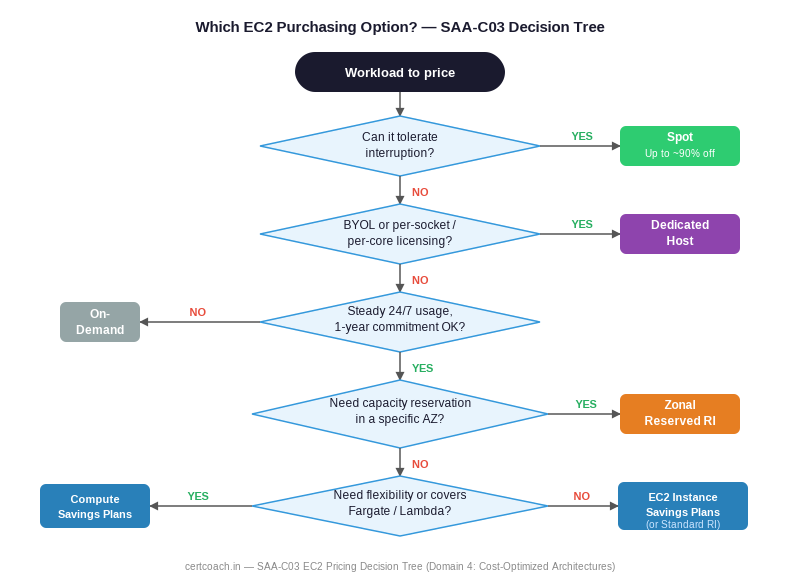
The exam embeds the answer in the scenario's workload description. Train yourself to extract three signals:
1. Duration and predictability
- "Short-term," "unpredictable," "variable" → On-Demand
- "Always-on," "steady-state," "24/7," "consistent" → Savings Plans or Reserved Instances
- "Flexible start/end time," "batch," "can tolerate interruption" → Spot
2. Flexibility requirement
- "Needs to change instance types," "spans multiple Regions," "also uses Fargate or Lambda" → Compute Savings Plans
- "Fixed instance family," "maximize discount" → EC2 Instance Savings Plans or Standard Reserved Instances
- "Needs capacity reservation in a specific AZ" → Zonal Reserved Instance (+ optionally an On-Demand Capacity Reservation)
3. Special requirements
- "BYOL," "per-socket/per-core licensing," "single-tenant compliance" → Dedicated Host
- "RDS," "ElastiCache," "Redshift" discounts needed → Reserved Instances (Savings Plans don't cover these)
- No special requirement, just cost savings → Savings Plans (AWS's current recommendation)
Apply these three filters in order and you reach the correct answer in almost every SAA-C03 cost-optimization question. For free practice on this exact decision pattern — with detailed explanations for every wrong answer — try the SAA-C03 practice questions on CertCoach.
Common SAA-C03 Scenario Patterns
Scenario A — The steady web tier:
A company runs a web application on a fleet of EC2 instances that consistently uses 20 m5.xlarge instances, 24/7. They want to minimize cost with the highest possible discount while retaining the ability to switch to m6i instances if needed.
Answer: Compute Savings Plans (covers any EC2 family, highest flexibility, up to 66% off). EC2 Instance Savings Plans would lock them to m5 family; Standard RIs wouldn't let them switch to m6i without exchanging (Convertible RI) or buying new RIs.
Scenario B — The batch processing cluster:
A genomics company runs large-scale DNA-sequencing jobs on EC2. Each job takes 4–8 hours, can be restarted from a checkpoint if interrupted, and runs only during business hours. The company wants the lowest-cost compute.
Answer: Spot Instances. The job is long-running but checkpointing makes it fault-tolerant. "Lowest cost" + "can be restarted" = Spot.
Scenario C — The Oracle database migration:
A company migrates an Oracle database to EC2. Their Oracle license is per-socket and per-core, and their license agreement requires dedicated physical hardware.
Answer: Dedicated Host. BYOL + per-socket/per-core licensing + dedicated physical hardware = Dedicated Host only.
Scenario D — The capacity guarantee:
A financial services company needs a guarantee that it can always launch r5.4xlarge instances in us-east-1a, even during AWS capacity events.
Answer: Zonal Reserved Instance in us-east-1a (or an On-Demand Capacity Reservation in us-east-1a). The capacity reservation signal is "guarantee capacity in a specific AZ." Regional RIs and Savings Plans do not reserve capacity.
Scenario E — The mixed workload:
A company runs a web application with a stable baseline of 10 On-Demand instances and uses Auto Scaling to handle traffic spikes up to 50 instances. They want to minimize the total EC2 spend.
Answer: Savings Plans for the baseline + Spot Instances for the Auto Scaling scale-out capacity (using a mixed-instances policy). This is the classic hybrid architecture: committed pricing for the predictable base, Spot for interruptible burst.
SAA-C03 Exam Checklist: EC2 Purchasing Options
Before exam day, make sure you can answer each of these without hesitating:
- AWS now recommends Savings Plans over Reserved Instances for new EC2 commitments
- Compute Savings Plans cover EC2, Fargate, and Lambda; EC2 Instance Savings Plans cover only one EC2 instance family/Region
- Spot Instances are correct only when the workload can tolerate interruption
- Zonal RIs reserve capacity; Regional RIs and Savings Plans are billing discounts only
- Dedicated Hosts solve BYOL and per-socket licensing — not cost optimization by itself
- RDS, ElastiCache, Redshift, and OpenSearch discounts come from Reserved Instances, not Savings Plans
For more cost-optimization exam prep, see AWS certification cost breakdown for exam fees across the cert stack, and check your readiness with the free SAA-C03 diagnostic.
Frequently Asked Questions
The FAQ below covers the question patterns that appear as dedicated SAA-C03 questions, not just as answer choices.