AWS Route 53 Routing Policies: The SAA-C03 Decision Tree That Unlocks Every DNS Scenario
Seven routing policies, one exam scenario at a time. Learn exactly when to choose Simple, Weighted, Latency, Failover, Geolocation, Geoproximity, or Multivalue Answer — and never lose a Route 53 question again.
Picture this: you're midway through the SAA-C03 and the question stem reads — "a global application has endpoints in us-east-1 and eu-west-1; the company must route European users to Frankfurt for GDPR compliance, route all other users to the lower-latency region, and automatically fail over if the primary region becomes unavailable."
The answer choices offer four different Route 53 routing policies. Two of them could plausibly satisfy part of the requirement. One satisfies all of it. And you have two minutes.
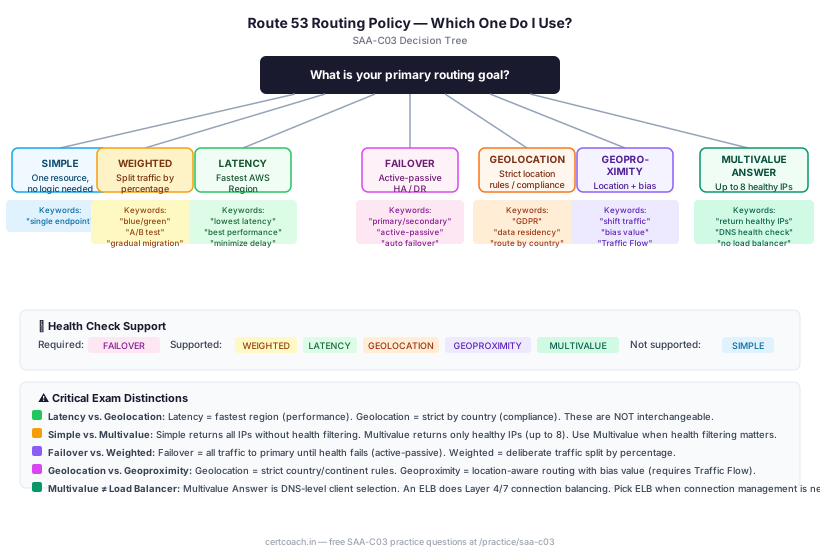
AWS Route 53 routing policies are among the most reliably tested SAA-C03 topics because the exam loves multi-condition DNS scenarios that eliminate six of the seven policies until one remains. The good news: there are only seven policies. Each one has a distinct shape, a small set of trigger keywords, and a decision rule you can apply in under 30 seconds. This post gives you all seven — plus the decision tree, exam keyword cheat sheet, and scenario walkthroughs.
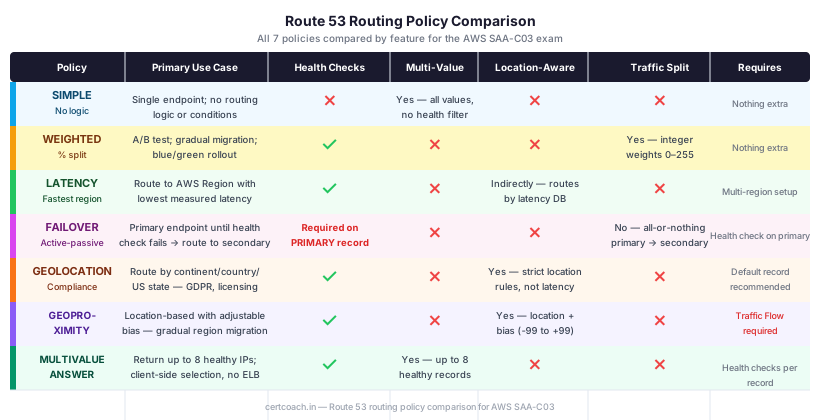
The Seven Routing Policies at a Glance
| Policy | Core purpose | Health check support | Returns multiple values? | SAA-C03 trigger keyword |
|---|---|---|---|---|
| Simple | Single endpoint, no routing logic | No | Yes (all values, no health filter) | "one resource", "no special routing" |
| Weighted | Traffic-split by percentage | Yes | No (one record at a time, weighted) | "blue/green", "A/B test", "gradual migration" |
| Latency | Lowest-latency AWS Region | Yes | No | "fastest response", "best performance", "minimize latency" |
| Failover | Active-passive HA | Yes (required on primary) | No | "primary/secondary", "active-passive", "automatic failover" |
| Geolocation | Strict location-based routing | Yes | No | "GDPR", "data sovereignty", "route by country/continent" |
| Geoproximity | Location + adjustable bias | Yes | No | "shift traffic between regions", "expand/shrink geographic area" |
| Multivalue Answer | Multi-IP with health-aware DNS | Yes | Yes (up to 8 healthy) | "return multiple healthy IPs", "DNS-level health check" |
Simple Routing: One Resource, No Conditions
Simple routing is Route 53's default and most straightforward policy. You create a record, point it at a resource, and Route 53 returns that value for every DNS query — no conditions, no health checks, no traffic logic.
The multi-value trap: You can configure multiple IP addresses on a single Simple record (e.g., three EC2 public IPs). Route 53 returns all of them in randomized order, and the client picks one. This looks like load balancing, but Simple routing does not health check — if one of those IPs is unhealthy, Route 53 still includes it in the response and clients still try it.
Exam signal: When a question says "route traffic to a single resource" or "no routing logic required," Simple routing is the answer. When a question says "health-check-aware" or "only return healthy endpoints" while returning multiple IPs, Simple routing is eliminated — reach for Multivalue Answer instead.
Weighted Routing: Traffic-Splitting and Blue/Green
Weighted routing lets you assign an integer weight (0–255) to each record set. Route 53 calculates the fraction of traffic each record receives: weight / sum_of_all_weights. A record with weight 80 alongside a record with weight 20 receives 80% of traffic; the other receives 20%.
Key behaviors the exam tests:
- Weight = 0: The record receives no traffic but still exists. This is the exam's mechanism for "temporarily send no traffic to this version without deleting the record."
- Health checks on weighted records: If you associate health checks, Route 53 removes unhealthy records from the weighted calculation. The remaining healthy records rebalance their ratios automatically.
- Gradual migrations: The canonical exam pattern — "gradually shift traffic from an on-premises data center to AWS" → Weighted records, starting at 10% AWS / 90% on-premises, incrementally increasing the AWS weight.
Official AWS docs: Weighted routing policy
Latency-Based Routing: Route to the Fastest Region
Latency routing evaluates the measured network latency between the user's DNS resolver and each AWS Region where you've created latency records, then returns the record for the region with the lowest latency. AWS continuously updates a global latency database to inform these decisions.
The critical nuance: Lowest latency is not necessarily geographically closest. Transatlantic fiber routing, peering agreements, and congestion can make a more distant region faster. A user in Mumbai might have lower latency to Singapore than to Mumbai on a given Tuesday morning. Route 53 routes to the faster option — the exam tests whether you understand this.
Health checks: Associate health checks with latency records and Route 53 will skip an unhealthy region and route to the next-best latency alternative.
Exam signal: Look for "minimize latency," "best performance," "fastest response," "lowest round-trip time," or "route to the AWS Region with the best response time." Whenever performance across multiple AWS Regions is the goal, Latency routing is the answer — not Geolocation (which ignores performance entirely).
Official AWS docs: Latency-based routing
Failover Routing: Active-Passive Disaster Recovery
Failover routing implements the active-passive disaster recovery pattern at DNS level. You create two records with the same name and type: one designated PRIMARY and one SECONDARY. Route 53 monitors the primary's health check and sends all traffic to the primary as long as it's healthy. When the primary's health check fails, Route 53 automatically starts returning the secondary's value.
Requirements the exam loves to test:
- A health check is mandatory on the primary record. Without it, Route 53 has no signal to trigger failover and the configuration is invalid.
- The secondary can be anything — another EC2 instance in a different AZ or region, an S3 static website for a maintenance page, or an ELB.
- If you want both primary and secondary to be health-checked, add health checks to both.
Classic exam pattern: "Company X has a primary application in us-east-1 and a standby in us-west-2. If the primary is unavailable, traffic should automatically route to the standby." → Failover routing policy, with a health check on the primary record.
Official AWS docs: Failover routing policy
Geolocation Routing: Data Sovereignty and Strict Location Rules
Geolocation routing maps DNS queries to records based on the origin location of the query — the continent, country, or (for the US) state of the user's DNS resolver. Route 53 evaluates records in order of specificity: country match → continent match → default record.
The default record requirement: If a query arrives from a location you haven't explicitly configured (a country without a matching record), Route 53 returns the default record if one exists. If you don't configure a default record and no location match is found, Route 53 returns a "no answer" response — the user can't resolve your domain. The exam tests this omission as a trap.
Use Geolocation when:
- Data must stay in a specific jurisdiction (GDPR, HIPAA, regional data-residency laws)
- You serve localized content (language-specific websites, region-specific pricing pages)
- You need to restrict access by country (licensing agreements, regional service availability)
Critical distinction from Latency: Geolocation does not consider performance — a European user gets the European endpoint even if the US endpoint has lower latency that day. If performance is the goal, Latency routing wins. If legal/compliance is the goal, Geolocation wins.
Official AWS docs: Geolocation routing
Geoproximity Routing: Traffic Shifting with Bias
Geoproximity routing is Route 53's most nuanced policy. Like Geolocation, it routes traffic based on user location. Unlike Geolocation, it lets you apply a bias value (–99 to +99) to each resource that adjusts how much of the surrounding geography that resource "attracts."
- Positive bias (+1 to +99): Expand the geographic catchment. More users from farther away get routed to this resource.
- Negative bias (–1 to –99): Shrink the catchment. Fewer nearby users get routed here; they spill over to neighboring resources.
- Bias = 0: Pure geographic proximity with no adjustment.
Requires Traffic Flow: Geoproximity routing is only available through the Route 53 Traffic Flow visual editor (not through standard record sets in the console). The exam may test this as a configuration requirement.
Use Geoproximity when: You're migrating traffic from one AWS Region to another and want to gradually shift the geographic boundary. Setting a high positive bias on the new region gradually pulls more users toward it while the old region handles the remainder.
Official AWS docs: Geoproximity routing
Multivalue Answer Routing: Health-Aware DNS Fan-Out
Multivalue Answer routing returns up to eight randomly selected, healthy records in response to each DNS query. The client chooses which IP to connect to. Route 53 performs health checks on each record and excludes unhealthy endpoints from the response pool.
The key differentiator from Simple multi-value: If you put three IPs in a Simple record, Route 53 returns all three regardless of health. If you use Multivalue Answer records with health checks, Route 53 returns only the healthy ones (up to eight).
The key differentiator from a load balancer: Multivalue Answer is DNS-level client-side selection. The client picks from the returned IPs using its own resolver logic. An Elastic Load Balancer performs Layer 4/7 connection-level balancing, sticky sessions, SSL termination, and path-based routing — it actively manages ongoing connections, not just initial routing. The SAA-C03 exam will offer Multivalue Answer as an answer to questions about simple multi-endpoint availability scenarios and ELB as an answer when advanced connection management is needed.
Official AWS docs: Multivalue answer routing
The Routing Policy Comparison Reference
Three Scenario Walkthroughs
Scenario 1: Multi-Region Blue/Green Deployment
An e-commerce company is migrating its website from an on-premises data centre to AWS. The migration plan calls for gradually shifting 10%, then 25%, then 50%, then 100% of production traffic to the new AWS environment over four weeks, with the ability to roll back instantly if error rates spike. Which Route 53 configuration should the solutions architect recommend?
Correct answer: Weighted routing with two records — one pointing to the on-premises endpoint, one to the AWS ELB — and an associated health check on each.
Reasoning:
- "Gradually shifting" a percentage of traffic → Weighted routing. Start at 90 (on-prem) / 10 (AWS), then adjust weights each week.
- "Roll back instantly" → Set the AWS record weight to 0. Traffic immediately reverts to 100% on-premises without deleting any configuration.
- Health checks on both records mean a sudden failure at either endpoint removes it from the weighted pool while the other absorbs full traffic.
Why not Latency? Latency routing selects the fastest region automatically — you can't control the 10/25/50% split.
Why not Failover? Failover is all-or-nothing: primary until health check fails, then secondary. You can't gradually migrate with it.
Scenario 2: Compliance-Driven Multi-Region Architecture
A SaaS company serves enterprise customers in Europe and the United States. European customers' data must never leave the EU (GDPR requirement). All other customers should be routed to whichever region offers the best performance. Which Route 53 configuration satisfies both requirements?
Correct answer: A combination of Geolocation routing for European countries + Latency routing for the default.
This is a multi-policy scenario. Route 53 allows you to build policies using Traffic Flow that combine rules. The architecture:
- Geolocation records for each EU country/continent → point to the eu-west-1 (or eu-central-1) endpoint.
- Default record → point to a Latency routing configuration across us-east-1 and ap-southeast-1.
- A non-EU user resolves to whichever of the non-EU regions has lower latency. An EU user resolves to the EU endpoint regardless of latency.
Why not Geoproximity for the EU requirement? Geoproximity is about traffic shaping with bias — it doesn't enforce strict country-level compliance boundaries. A geoproximity policy might route 95% of European users to Frankfurt, but 5% might spill to us-east-1 based on proximity math. Geolocation is the correct policy when the requirement is strict.
Scenario 3: Simple Availability vs. Health-Aware DNS
A startup runs a web application on three EC2 instances with three public IP addresses. There is no load balancer. The team wants Route 53 to return only healthy IP addresses in DNS responses if one instance fails. Which routing policy should they use?
Correct answer: Multivalue Answer routing with a health check associated with each record.
This is the canonical trap question. The naive answer is "Simple routing with all three IPs" — but Simple routing doesn't health check. If an instance fails, Simple routing still returns its IP and clients still try it.
Multivalue Answer with health checks creates three separate record sets (same name, same type, one IP each, each with a health check). Route 53 returns up to eight healthy values. If one instance's health check fails, its IP is excluded from responses. The client connects to one of the remaining healthy IPs.
Why not an ALB/NLB? The question says "no load balancer" — this is specifically testing whether you know Multivalue Answer can provide basic health-aware multi-endpoint DNS without one.
Exam Keyword Cheat Sheet
When the question includes these keywords, the routing policy is nearly certain:
| Keyword / scenario fragment | Route 53 policy |
|---|---|
| "One resource", "single endpoint", "no routing logic" | Simple |
| "Blue/green", "A/B test", "gradual migration", "10% of traffic" | Weighted |
| "Lowest latency", "best performance", "fastest region", "minimize delay" | Latency |
| "Primary/secondary", "active-passive", "automatic failover", "if unhealthy, route to" | Failover |
| "GDPR", "data residency", "route users in France to", "country-specific" | Geolocation |
| "Shift traffic between regions", "bias", "expand coverage area" | Geoproximity |
| "Return multiple healthy IPs", "DNS-level health check", "up to 8 endpoints" | Multivalue Answer |
Common Exam Traps to Dodge
Trap 1: Using Geolocation when the goal is performance. Geolocation routes by origin location, not latency. A European user always gets the European endpoint even if the US endpoint is faster that day. If the question says "minimize latency" or "best performance" — that's Latency routing, not Geolocation.
Trap 2: Forgetting the default record in Geolocation routing. Geolocation without a default record returns no answer for unmatched locations. If the question says "all other users should also be served," you need a default record. Missing this is an incorrect configuration — the exam may test it as a trap answer.
Trap 3: Treating Simple multi-value as health-aware. Simple routing with multiple IP values returns all IPs regardless of health. Multivalue Answer routing returns only healthy IPs. The exam will describe a scenario needing health filtering at DNS level and offer both policies as answer choices.
Trap 4: Using Latency routing when compliance requires strict geographic control. Latency routing routes to the fastest region — it doesn't enforce that EU users always stay in the EU. The exam loves to pair a performance goal (Latency) with a compliance requirement (Geolocation) and see whether you distinguish them.
Trap 5: Forgetting that Geoproximity requires Traffic Flow. You cannot create Geoproximity records in the standard Route 53 record editor. It requires the Traffic Flow visual policy builder. The exam may test this as a configuration prerequisite.
Trap 6: Misidentifying Multivalue Answer as a load balancer replacement. Multivalue Answer is not an ELB. It provides DNS-level client-side randomization with health filtering. An ELB provides Layer 4/7 connection balancing, sticky sessions, SSL offloading, and path routing. If the question asks for "load balancing," the answer is an ELB. If it asks for "return multiple healthy DNS addresses," the answer is Multivalue Answer.
Exam-Day Decision Checklist
When you hit a Route 53 routing question on the SAA-C03, run through this sequence:
- Is there only one endpoint and no traffic logic required? → Simple
- Does the scenario require traffic split by percentage, or gradual migration? → Weighted
- Is the goal to route to the fastest AWS Region for each user? → Latency
- Is there a primary endpoint that should receive all traffic until a health check fails? → Failover
- Is routing based on where the user is from, for compliance or localization? → Geolocation
- Is there a need to shift geographic traffic boundaries using a bias value? → Geoproximity
- Should DNS return multiple healthy IPs with client-side selection? → Multivalue Answer
- Does the scenario mention both a compliance requirement (EU data stays in EU) AND a performance requirement (all others get lowest latency)? → Combine Geolocation (for the compliant region) with Latency (as the default)
Practice Makes the Policy Click
Reading through the seven policies is one thing. Seeing them as trap-laden SAA-C03 scenarios — where Geolocation and Latency look identical until one compliance keyword separates them — is another.
CertCoach generates Route 53 scenario questions that work exactly this way: the stem gives you a real architectural requirement, the distractors are plausible-sounding wrong answers, and the AI tutor explains the keyword signal that makes the correct answer obvious after you've seen it.
Start free with the SAA-C03 10-question diagnostic — no signup required — and find out how you're doing on networking and routing questions. When you're ready to drill, the free SAA-C03 practice questions at CertCoach cover Route 53 routing policies across every scenario type the exam uses.