DynamoDB vs RDS: The AWS Database Decision the SAA-C03 Tests Every Time
DynamoDB and RDS solve completely different problems — and the SAA-C03 exploits every difference. Here's the complete guide to choosing correctly on exam day, with real exam scenarios and the signal words that make each answer obvious.
Here is a scenario you will see on the SAA-C03:
A gaming company is building a leaderboard feature that must store and retrieve player scores for millions of concurrent users worldwide. The access pattern is always by player ID — the application never runs JOIN queries or generates reports. The solution must handle sudden traffic spikes of up to 500,000 read requests per second without pre-warming. Which AWS database service should a solutions architect recommend?
Four choices appear. One is RDS MySQL Multi-AZ. One is Aurora MySQL with Read Replicas. One is Amazon Redshift. One is Amazon DynamoDB with on-demand capacity.
The answer is DynamoDB — but only if you understand why RDS and Aurora are wrong here, not just that they are. The exam will give you scenarios where Aurora is clearly correct (see our Aurora vs. RDS guide), and scenarios where DynamoDB is clearly correct. The difference comes down to the access pattern, not the data's importance or the company's size.
DynamoDB vs RDS is one of the exam's most frequently tested database pairs, appearing across SAA-C03's Design High-Performing Architectures, Design Resilient Architectures, and Design Cost-Optimized Architectures domains. Get the mental model right once, and it pays off across dozens of questions.
The Fundamental Split: NoSQL vs Relational
Before the exam signals, you need the right mental model for what these two services fundamentally are.
Amazon RDS is a managed service that runs a relational database engine — MySQL, PostgreSQL, Oracle, SQL Server, or MariaDB — on EC2-backed instances with EBS storage. It speaks standard SQL. You define tables with fixed schemas. You write queries that JOIN tables, GROUP rows, filter on arbitrary columns, and generate reports. RDS's power is SQL's power: any question you can express in SQL, RDS can answer.
That power comes with a constraint: scale is bounded by the instance. RDS scales vertically by moving to a larger instance type. Read Replicas help with read-heavy workloads. But there is a ceiling — a single relational engine, no matter how large, will eventually be overwhelmed by extreme write rates. And every Lambda function opening a new database connection compounds this: RDS has a hard connection limit (typically 5,000–16,000 depending on instance class and memory). At Lambda concurrency of thousands of concurrent invocations, each trying to open a connection, RDS can be exhausted — which is why the SAA-C03 and DVA-C02 both test RDS Proxy as the workaround for Lambda-to-RDS scenarios.
Amazon DynamoDB is a fully managed serverless NoSQL database. It stores data as items (roughly analogous to rows) in tables, but without a fixed schema — each item can have different attributes. Every item has a primary key: either a partition key alone, or a partition key plus a sort key. All data access goes through the primary key or a defined secondary index. There is no JOIN. There is no SELECT * WHERE category = 'shoes' ORDER BY price across millions of items (unless you model for it). The rule that unlocks DynamoDB: design your access patterns first, then model the table around them — the opposite of relational design.
The architectural trade-off: DynamoDB omits the complexity that limits relational scale. Because it doesn't support JOINs or arbitrary queries, it can distribute data across hundreds of servers behind the scenes and route each request directly to the correct partition. The result: single-digit millisecond performance at any scale — whether your table has 100 items or 100 billion, the latency for a key-based lookup is the same.
DynamoDB vs RDS: The Exam Comparison Matrix
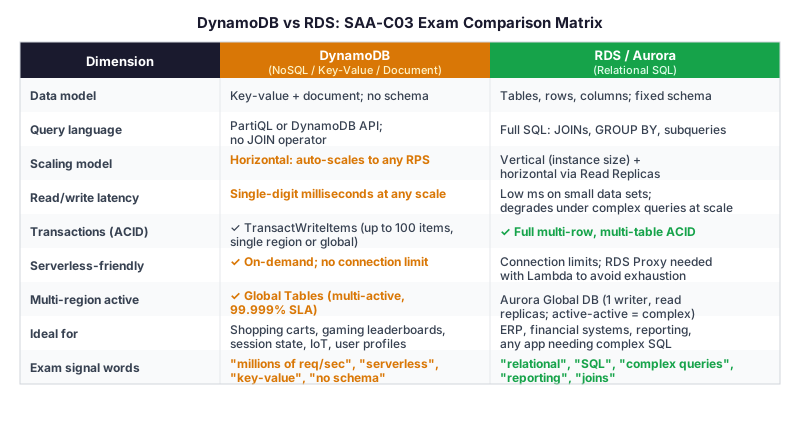
The dimensions that generate the most exam questions:
Scaling: DynamoDB scales horizontally and automatically. With on-demand capacity mode, there is no capacity planning — DynamoDB handles 500,000 requests per second the same way it handles 500. RDS scales by instance size (vertical) plus Read Replicas (read horizontal). No amount of Read Replicas helps with write scale on RDS.
Serverless compatibility: DynamoDB has no persistent connections. Lambda functions call DynamoDB through HTTPS API requests — each request is stateless, there are no connection pools, and there is no connection exhaustion. RDS uses persistent TCP connections. Lambda at scale requires RDS Proxy between Lambda and RDS to multiplex connections and prevent exhaustion. The exam tests this: "Lambda functions are causing connection exhaustion on RDS" → the fix is RDS Proxy, not switching to DynamoDB (though DynamoDB would also solve it — but that requires a data model change the question won't invite).
Query capability: DynamoDB supports PartiQL (an SQL-compatible query language) but only for item-level access — you cannot JOIN two DynamoDB tables or run aggregations across millions of items efficiently. If a scenario mentions reporting, dashboards, complex analytics, or SQL queries with multiple tables, DynamoDB is not the answer. RDS or Aurora is correct.
Multi-region active-active: DynamoDB Global Tables provide multi-active replication across AWS Regions with a 99.999% availability SLA and sub-second replication lag. Any region can handle reads and writes simultaneously. Aurora Global Database has one primary writer region and read-only secondary regions (with the option to promote a secondary to primary for failover). If a scenario says "active-active across regions" for a database, that's DynamoDB Global Tables.
The AWS Database Decision: When to Choose Each
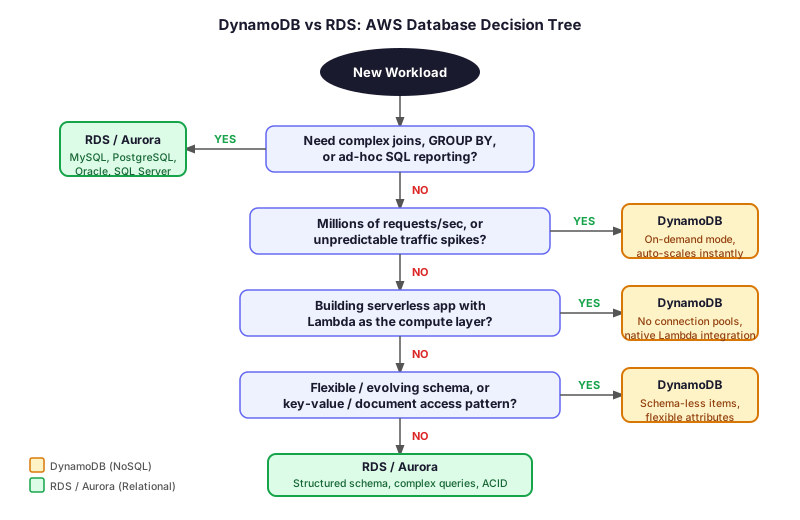
Work through these questions in order when you see a database scenario on the exam:
1. Does the workload need SQL — JOINs, GROUP BY, complex multi-table queries, or ad-hoc reporting? → YES: RDS or Aurora (depending on scale/failover requirements — see the Aurora vs. RDS guide). → NO: Continue.
2. Does the scenario describe millions of requests per second, unpredictable spikes, or horizontal scale without pre-provisioning? → YES: DynamoDB with on-demand capacity. → NO: Continue.
3. Is this a Lambda-based serverless application where connection management is a concern? → YES: DynamoDB (no connections) or RDS with RDS Proxy. → NO: Continue.
4. Is the access pattern always by a known key (player ID, user ID, order ID, session token)? → YES: DynamoDB — it is purpose-built for key-based access. → NO: If you need to query by arbitrary attributes, RDS or Aurora with full SQL is more practical.
DynamoDB Concepts the SAA-C03 Tests Directly
Partition Key Design and Hot Partitions
DynamoDB distributes data across partitions using a hash of the partition key. If thousands of requests target the same partition key — for example, all writes go to partition key "global" — that partition becomes a hot partition and gets throttled. The fix: use a partition key with high cardinality (user ID, device ID, UUID) so traffic is naturally spread.
The exam presents this as: "A DynamoDB table is experiencing throttling despite having sufficient WCU capacity. Which action should a solutions architect take?" → The answer is to redesign the partition key to improve data distribution, not to add more capacity.
On-Demand vs Provisioned Capacity
DynamoDB offers two billing modes:
-
Provisioned capacity: You specify Read Capacity Units (RCUs) and Write Capacity Units (WCUs). One RCU = one strongly consistent read of an item up to 4 KB per second (or two eventually consistent reads). One WCU = one write of an item up to 1 KB per second. You pay for reserved capacity whether or not you use it. Best for predictable, steady workloads — can save significant money vs on-demand.
-
On-demand capacity: DynamoDB scales automatically to any request rate. You pay per actual read and write request. No capacity planning. Best for new tables, unpredictable traffic, or bursty workloads. Costs more per request than provisioned at high steady-state traffic.
The SAA-C03 signal: "spiky or unpredictable workload" → on-demand. "Stable, well-understood traffic pattern" → provisioned with auto-scaling.
DynamoDB Accelerator (DAX)
DAX is an in-memory cache, purpose-built for DynamoDB, that sits between your application and the table. It is API-compatible — your code calls DAX with the same DynamoDB API calls, and DAX serves cache hits from memory (microsecond latency) and cache misses from the underlying table (millisecond latency). DAX can deliver up to 10× read performance improvement.
When DAX is correct on the exam: "A DynamoDB table powering a product catalog is experiencing read latency of 5 ms under peak load. The team needs sub-millisecond read latency." → Add DAX. Not a bigger table or more RCUs — those won't change the single-digit ms baseline. Only DAX pushes reads to microseconds.
When DAX is not the answer: Write-heavy workloads. DAX caches reads, not writes. It does not help reduce write latency or cost.
DynamoDB Streams
DynamoDB Streams captures a time-ordered log of every item-level change — insert, modify, delete — for up to 24 hours. You connect a Lambda function as a stream consumer, and Lambda is invoked automatically when items change. This is the AWS-native pattern for event-driven processing of database changes.
Exam signal: "Whenever an order is added to the Orders DynamoDB table, a Lambda function must send a confirmation email." → DynamoDB Streams triggering Lambda. Not EventBridge, not SQS — the trigger is directly on the table.
Global Tables
DynamoDB Global Tables provide fully managed multi-active replication across AWS Regions. Each region maintains a full replica of the table and accepts both reads and writes. DynamoDB handles conflict resolution automatically using last-writer-wins. You get 99.999% availability SLA.
Exam signal: "Users in the US, Europe, and Asia all need low-latency read and write access to the same product inventory data." → DynamoDB Global Tables. Aurora Global Database provides one-region writes only; Global Tables is the only AWS managed database with multi-active writes across regions out of the box.
The Common Trap: DynamoDB Has Transactions Too
A frequent incorrect exam answer is choosing RDS over DynamoDB because "DynamoDB doesn't support transactions." This was true before November 2018 — it is no longer true.
DynamoDB supports ACID transactions via TransactWriteItems (up to 100 write operations across one or more tables in one atomic operation) and TransactGetItems (up to 100 reads). These transactions are strongly consistent. They work across multiple tables in the same region.
What DynamoDB transactions cannot do: span complex SQL operations, aggregate across arbitrary sets of rows, or replace multi-step relational business logic that relies on arbitrary JOIN results. DynamoDB transactions are item-level — you specify the exact keys you want to atomically read or write.
If an exam scenario says "the payment system needs ACID guarantees for updating account balances" — that alone does not rule out DynamoDB. If the scenario also says "account balances are aggregated across products in a complex report" — that points to RDS.
Exam Scenario Drills
Scenario 1: A social media startup expects 10 million daily active users. Each user has a profile with custom attributes — some users have a bio, others don't. The application reads profiles by user ID with sub-10-ms p99 latency requirements. Which database should a solutions architect recommend?
→ DynamoDB. Key signals: access by known key (user ID), flexible attributes (DynamoDB items are schema-less), high-throughput read requirement, sub-10-ms latency. RDS would work for small scale but won't sustain 10 million DAU reads at those latencies without massive instance scaling.
Scenario 2: A retail company runs a monthly sales report that joins the Orders table, the Products table, and the Customers table across 3 years of historical data. The report takes 45 minutes to run on RDS MySQL. Which service should the team migrate the reporting workload to?
→ Amazon Redshift (not DynamoDB). The workload is analytical SQL with complex joins — DynamoDB cannot run this. Redshift is the AWS-managed data warehouse for exactly this pattern. This scenario tests that you know DynamoDB's limits, not just its strengths.
Scenario 3: A real-time bidding platform processes 200,000 write requests per second during peak auction events. Each write is a new bid record identified by auction ID plus bidder ID. There are no complex queries — the application reads bids only by auction ID.
→ DynamoDB. 200,000 writes/second is far beyond what a single RDS or Aurora writer instance can sustain. DynamoDB's on-demand capacity handles this directly. The access pattern (auction ID as partition key, bidder ID as sort key) is a textbook DynamoDB use case.
Practice Makes the Pattern Obvious
These database scenarios follow repeatable patterns — once you've drilled 15–20 of them, the signal words map automatically to the correct answer. The free 10-question diagnostic will tell you in 10 minutes whether your database concepts are ready for exam day. If DynamoDB questions are your weak spot, the SAA-C03 practice set includes a full database domain breakdown so you can target exactly what you need.
The same logic covered here applies to the DVA-C02, which tests DynamoDB at a deeper API level — partition key design, capacity modes, Streams, and DAX all appear in the DVA-C02's Development with AWS Services domain.
Summary: DynamoDB vs RDS Signal Words
When you see these words in an exam question, you are almost certainly looking at DynamoDB:
- "millions of requests per second" / "any scale" / "unpredictable spikes"
- "key-value" / "document" / "no schema" / "flexible attributes"
- "serverless" + database (Lambda + DynamoDB is the canonical serverless stack)
- "active-active across regions" / "global tables" / "multi-region writes"
- "gaming leaderboard" / "session state" / "shopping cart" / "IoT device data" / "user profile"
- "sub-millisecond" (when paired with DAX)
When you see these words, you are almost certainly looking at RDS or Aurora:
- "relational" / "SQL" / "complex queries" / "JOINs" / "GROUP BY"
- "reporting" / "analytics" / "dashboards" / "ad-hoc queries"
- "existing application" with a relational schema that cannot be redesigned
- "financial reporting" / "ERP" / "CRM" (usually relational workloads)
- "sub-30-second failover" (points to Aurora specifically — not DynamoDB, not standard RDS)
The database decision on the SAA-C03 is almost always a question of access pattern, not importance. The most mission-critical system in the world can correctly use DynamoDB — Amazon's own fulfillment centers and Alexa run on it. The question is always: does the workload need SQL and complex joins, or does it need key-based access at any scale?